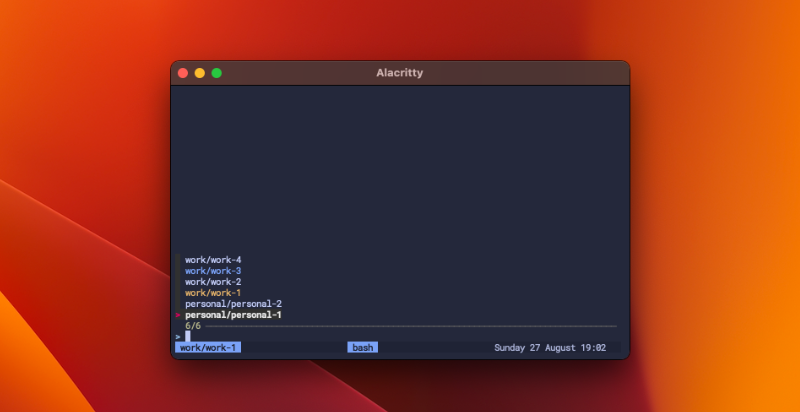
Rationale
I found myself growing increasingly frustrated with the need to rapidly switch between multiple coding projects. To tackle this, I resorted to managing various terminal sessions, utilizing Amethyst – a tiling window manager for macOS. The challenge arose when these sessions began to stack up, often reaching three or more terminals in full-screen mode, making it easy to lose track of which window corresponded to which project.
Although I had previously tried my hand at using Tmux and even delved into experimenting with Tmuxinator, neither option truly resonated with me. The process of managing and navigating sessions was less intuitive than my initial expectations. Tasks like crafting sessions, renaming them, or typing out the complete tmuxinator command alongside the project name often felt cumbersome.
Recently, I was inspired by a video of ThePrimeagen, He implemented fzf a fuzzy search program for selecting his project folders, enabling seamless switching between projects, even when not yet within a tmux session.
This inspiration prompted me to develop a similar program with the following key objectives:
- It should exclusively list project directories.
- It should instantiate a new tmux session at the root of the selected project.
- It should provide the capability to attach from outside of tmux to an existing session, if one is available.
- It should switch to an existing session, provided that it is already attached to an other a tmux session.
Lets get started
Let's begin by creating a file named project-launcher within the ~/.local/bin/ directory and open ~/.local/bin/project-launcher in your text editor of choice.
    #!/usr/bin/env bash

...
Let's begin by addressing our inputs, specifically the project folders that we intend to present as options. All of my project directories are situated within ~/projects, categorized into either personal projects or various organization projects. The structure involves a distinct directory for personal projects and multiple directories housing organizational projects.
Consequently, our objective is to accommodate the passage of multiple paths, which will subsequently feature in our fuzzy search functionality. To achieve this, we'll designate these paths under the -d flag. Furthermore, we should account for handling the --help and -h flags, while ensuring that any other scenarios prompt an appropriate error message.
With the aid of optargs, our implementation might take the following form:
    ...

optstring=":hd:-:"
while getopts ${optstring} arg; do
  case ${arg} in
    -)
      case "${OPTARG}" in
        help)
            usage
            ;;
        *)
            if [ "$OPTERR" = 1 ] && [ "${optspec:0:1}" != ":" ]; then
                echo "Invalid option --${OPTARG}" >&2
            fi
            ;;
      esac;;
    h)
      usage
      ;;
    d)
      multi+=("$OPTARG")
      ;;
    ?)
      echo "Invalid option: -${OPTARG}."
      exit 2
      ;;
  esac
done
shift $(expr $OPTIND - 1 )

...
Next, our focus is on utilizing the paths provided under the -d flag to generate two lists: one consisting of paths to all subdirectories containing projects, and the other containing project names to be displayed when we select a project.
To accomplish this, consider the following approach:
To begin, we pass the project paths to the find command, specifying an argument to limit the search to a single level deep.
    ...

projectPaths=($(find ${multi[@]} -mindepth 1 -maxdepth 1 -type d))

...
Additionally, we require the name of the session to which we are currently attached, along with a list of active sessions.
    ...

attachedSessionName=$(tmux display-message -p \#S)
sessions=$(tmux list-session -F \#S)

...
We iterate through each project path to create a roster of project names, which will be display through fzf. Moreover, we assess the activity status of the session, accentuating the name in blue if it's active. Furthermore, if the project name corresponds to the existing tmux session name, we emphasize this particular project in yellow.
...
projectDisplayNames=()
projectNames=()
for key in ${projectPaths[@]}; do
value=$(basename "$(dirname "${key}")")"/"$(basename "${key}")
projectNames+=($value)
if [[ $value == $attachedSessionName ]]; then
projectDisplayNames+=("[33m$value[0m")
elif $(contains ${value} ${sessions[@]}); then
projectDisplayNames+=("[34m$value[0m")
else
projectDisplayNames+=($value)
fi
done
...
Now, utilizing projectDisplayNames and prompt the user to select an option using fzf. The chosen option will then be used to retrieve the corresponding project path.
    ...

selectedProjectName=$(printf "%s\n" "${projectDisplayNames[@]}" | fzf --ansi)

index=$(indexOf ${selectedProjectName} ${projectNames[@]})
selectedPath="${projectPaths[$index]}"

...
The final step is to utilize the output from fzf, and us this to attach, switch to, or create a new tmux session. In case the user opts not to make a selection, we gracefully exit the process.
    if [[ -z $selectedProjectName ]]; then
    exit 0
fi

if ! $(contains ${selectedProjectName} ${sessions[@]} ); then
  tmux new-session -ds $selectedProjectName -c $selectedPath
fi

if ! [[ -z $TMUX ]]; then
  tmux switch-client -t $selectedProjectName
else
  tmux attach-session -t=$selectedProjectName
fi
The final product
The end result should resemble something like this.
~/.local/bin/project-launcher
#!/usr/bin/env bash
function usage {
echo "Project Launcher"
echo ""
echo "Launch tmux session at your project directory or attach/switch to an existing session"
echo "Supports fuzzy search power by fzf in multiple project directories"
echo ""
echo "Usage: $(basename $0) [-d <arg>...] [--] [DIRECTORY...]" 2>&1
echo ""
echo "projectPaths:"
echo " -d add directory for fuzzy search"
echo " -h|--help show usage"
exit 1
}
optstring=":hd:-:"
while getopts ${optstring} arg; do
case ${arg} in
-)
case "${OPTARG}" in
help)
usage
;;
*)
if [ "$OPTERR" = 1 ] && [ "${optspec:0:1}" != ":" ]; then
echo "Invalid option --${OPTARG}" >&2
fi
;;
esac;;
h)
usage
;;
d)
multi+=("$OPTARG")
;;
?)
echo "Invalid option: -${OPTARG}."
exit 2
;;
esac
done
shift $(expr $OPTIND - 1 )
function contains () {
local value=$1
shift
local elements=("$@")
for el in ${elements[@]}; do
if [[ "${el}" = "${value}" ]]; then
return 0
fi
done
return 1
}
function indexOf () {
local value=$1
shift
local elements=("$@")
for i in "${!elements[@]}"; do
if [[ "${elements[$i]}" = "${value}" ]]; then
echo "${i}";
break;
fi
done
}
if [[ $# -eq 1 ]]; then
selectedProjectName=$1
else
projectPaths=($(find ${multi[@]} -mindepth 1 -maxdepth 1 -type d))
attachedSessionName=$(tmux display-message -p \#S)
sessions=$(tmux list-session -F \#S)
projectDisplayNames=()
projectNames=()
for key in ${projectPaths[@]}; do
value=$(basename "$(dirname "${key}")")"/"$(basename "${key}")
projectNames+=($value)
if [[ $value == $attachedSessionName ]]; then
projectDisplayNames+=("[33m$value[0m")
elif $(contains ${value} ${sessions[@]}); then
projectDisplayNames+=("[34m$value[0m")
else
projectDisplayNames+=($value)
fi
done
selectedProjectName=$(printf "%s\n" "${projectDisplayNames[@]}" | fzf --ansi)
index=$(indexOf ${selectedProjectName} ${projectNames[@]})
selectedPath="${projectPaths[$index]}"
fi
if [[ -z $selectedProjectName ]]; then
exit 0
fi
if ! $(contains ${selectedProjectName} ${sessions[@]} ); then
tmux new-session -ds $selectedProjectName -c $selectedPath
fi
if ! [[ -z $TMUX ]]; then
tmux switch-client -t $selectedProjectName
else
tmux attach-session -t=$selectedProjectName
fi
to use the program we have writen you can run project-launcher -d ~/projects/personal/ -d ~/projects/work.
I prever to put this command behind an alias in my ~/.zshrc like so
    ...

alias p="project-launcher -d ~/projects/personal/ -d ~/projects/work"

...
Wrapping Up
I've been using this little script for a few weeks, and I must say, I'm committed to continuing using tmux this time. I hope that this serves as motivation for you to also develop your personal tools, ultimately enhancing both your productivity and workflow.